New Complaints
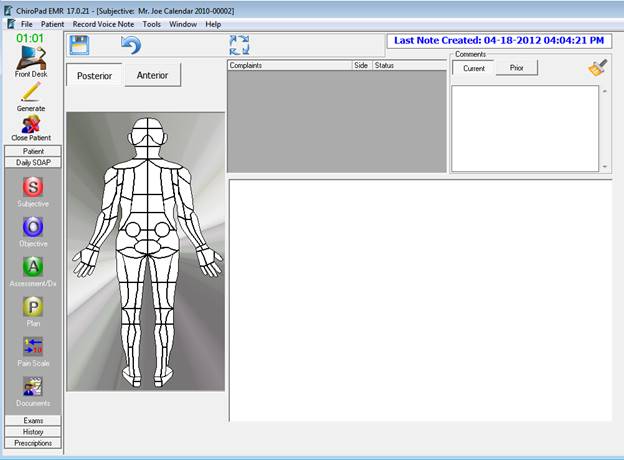
The Subjective screen (figure 1) is where the patient’s Subjective Complaints are entered and monitored on each visit. The first time this window is accessed for a patient, prior to making any entries, the Complaints box is empty and nothing is highlighted on the body view.
Figure 1
Depending on the Subjective Complaint of the patient, it may be necessary to change the view of the body. Note the buttons in the upper left corner of this window that allow the selection of either Posterior or Anterior view. By factory default, ChiroPadEMR is set to automatically show the Posterior view. This default can be changed in Settings. Please refer to Chapter 9 User Preferences and Settings. It is easy to flip back and forth between the Anterior and Posterior body views by clicking on the appropriate button.
Entering a Subjective Complaint for the patient is quick and easy. Point the mouse at the part of the body in which the patient has his/her complaint. Click on that body area and a list of possible problems appears (figure 2).
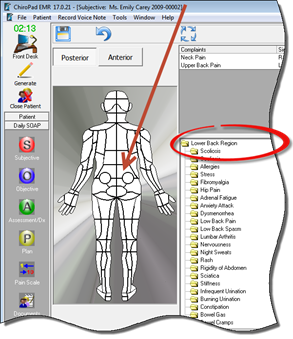
Figure 2
Double click on the Complaint that matches the patient’s problem. This opens the specific detail window (figure 3) for that Complaint. This is where all the information about the specific complaint is entered. Note that ChiroPadEMR does not force the entry of any data. The doctor/provider enters only that information that he/she wants to enter, or may be required by legal mandate. For example, the Complaint History is a Medicare requirement. If it is not entered and does not appear in the SOAP notes, a Medicare audit will reject the claims related to that Complaint.
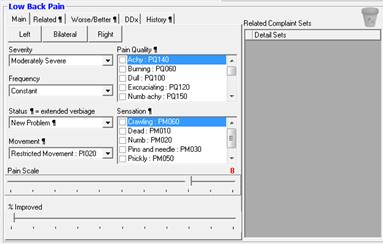
Figure 3
The Complaint detail window has 5 tabs, with many data fields in each for specific information related to the Complaint. The 5 tabs are Main, Related¶, Worse/Better¶, DDx, and History¶. The information entered in a tab with the paragraph symbol ¶ will only appear when a Status with the ¶ is selected.