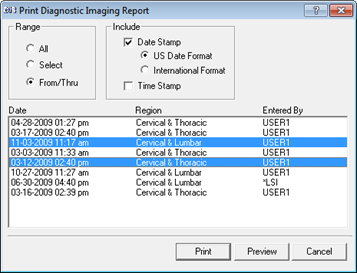
View and/or Print the saved or past DIR by clicking on the Prior Tab (figure 37). When the Prior Tab opens, all the DIR items that have previously been saved, even from a minute ago, will be listed on the left side of the window.
To View a specific DIR, click on its Date to highlight it. The DIR will be displayed in the lower box. Scroll through the DIR to see all its details.
To Print a specific, range or all Sensory Tests, click on the Printer icon on the Prior Tab. A Print Options (figure 37) window will open.
Figure 37
Select the Print option that is needed. The Range Selector enables the printing of a single DIR, all the DIRs in a patient file, or just a Range of specific dates.
•All is to print all the DIRs listed
•Select is to click on a single date and print only that one DIR
•From/Thru is to click on a start date and end date from the list of DIRs, and then the only DIRs that will print are those within the range.
Next, choose the type of Date Stamp format, either the US or International.
If either Select or From/Thru was chosen, click on the appropriate date(s).
To see the appearance of the DIR prior to actually printing, click the Preview button. Preview will display on the computer screen the DIR exactly as it will appear on paper. If it is satisfactory, simply click the Printer icon.
To Print without checking its appearance, click the Print button.