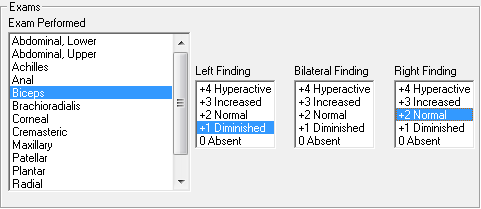
If the Preferences default Exam Type is Tendon Reflexes, then the Exam Performed box on the left, just below the Exam Date, displays the list of Tendon Reflexes (figure 40). If needed, click on the Exam Type drop down arrow to change from the default Tendon Reflexes to the Manual Stimulation Tests. Click on the name of the Reflex that was done to activate the Findings boxes (figure 43).
Figure 43
There are 3 Findings boxes, Left, Bilateral and Right. If the result of the Reflex Test is different on the left and right sides of the patient, then use the Left Finding and Right Finding boxes to make the entry. When the Reflex Test is the same on both sides, use the Bilateral Finding box.
If there are multiple Sensory Tests (Reflex or Manual Stimulation) that have the same result, hold the Control Key down while selecting all the tests that have the same finding. Once chosen, all the tests will be highlighted. Click on the Finding that applies to the group.