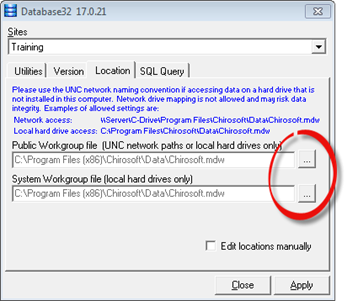
The Location tab (figure 6) controls where the computer will access the patient data as well as the location on the computer where the ChiroSuiteEHR programs are located. At the time the program is initially installed, the paths to the program and patient data must be entered, or the program will not work.
Figure 6
Public Workgroup file – This is the location of the patient data. If the practice has only one computer, then it will be in the found locally on that computer. If there are multiple computers in the practice, then it is a shared database that is located on the main server computer. Each workstation computer must show the server computer path.
The Public Workgroup file is the location of your live data. If you are making settings on a computer that is not the server, use the UNC network naming convention, e.g., \\SERVER\Chirosoft\Data\Chirosoft.mdw, where SERVER is the server’s network share name and Chirosoft is the shared folder containing the data. The best method is to use the “…” browse button to point to the file. Do not use mapped drive letter names.
System Workgroup file – This is the local computer’s installation path. It points to parts of the program that are installed on the local computer, and contains local data essential for program operation. Normally, it does not require any changes.