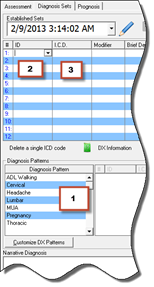
ChiroSuiteEHR provides 3 methods of entering the Diagnosis for a patient (figure 12).
1. Diagnosis Patterns – This is the most rapid method of entering the Diagnosis. Select the Pattern, Choose the line items in the sequence they should appear in SOAP notes and insurance claims, and click the Apply button. Creating, modifying, deleting and using Diagnosis Patterns will be discussed later in this chapter.
2. ID Number search – Line by line, search and enter by the system’s ID number. Click in the ID column on the line that the diagnosis should appear on to activate the drop down arrow. Click on the drop down arrow that is in that box in the ID column and scroll through the list of Diagnosis IDs. When the desired diagnosis is located, click on it.
3. ICD Code search – Line by line, search and enter by the ICD code. Click in the I.C.D. column on the line that the diagnosis should appear on to activate the drop down arrow. Click on the drop down arrow that is in that box in the I.C.D. column and scroll through the list of Diagnosis ICDs. When the desired diagnosis is located, click on it.
Figure 12