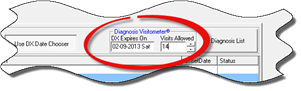
The Diagnosis Visitometer is a very important function that helps the practice to be compliant with insurance and Medicare regulations, as well as providing a very important reminder service. The Diagnosis Visitometer generates a pop up reminder when the Diagnosis has expired. It is set by either or both date and number of visits (figure 11).
Figure 11
The Diagnosis Visitometer is located to the right of the Use DX Date Chooser button. Set the date by clicking into the Date field and typing it in, or by double clicking the Date field to bring up the calendar and selecting the date. The number of visits is entered by either typing in the number or by using the up and down arrows next to the number field. Click the Save icon at the top of the window to complete the Diagnosis Visitometer entry.
The Diagnosis Visitometer can be set individually for either date or number of visits, or for both. When both are set, whichever is met first triggers the pop up.
There are 3 things the Diagnosis Visitometer is used for:
1. Reminder to change the diagnosis
2. Reminder to schedule a re-examination
3. For Cash/Self-Pay patients, it serves as a notice that the pre-paid or special arrangement has ended and it is now time to renew or renegotiate with them.