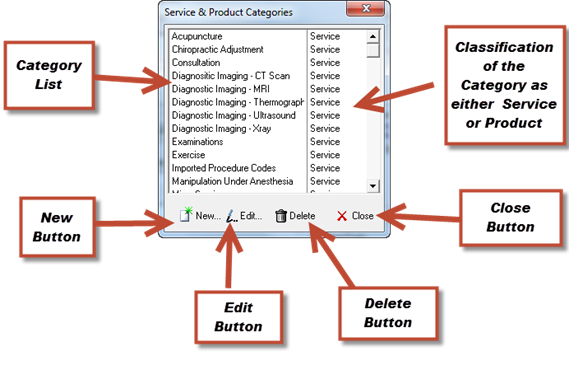
The products and services that are performed in the practice can be grouped by Category. This sorts the products and services in the Procedure Pick List and in reports such as the Procedure Catalog Master List. Select the Category that this product or service belongs in from the drop down list. The list of product and service categories may be edited (create, modify, or delete) by clicking on the Categories button at the top of the window. This opens the mini-window shown in figure 29.
•To create a new category, click the New icon, enter a name and select the classification, and click OK.
•To modify a category, click on the category name so it is highlighted, then click the Edit button, change either or both the name and/or classification, then click OK.
•To delete a category, click on the category name to highlight it and then click Delete. Note that a safeguard is built into ChiroSuiteEHR to prevent a problem from developing. If the Category is in use, that is, products and/or services have been assigned to it, ChiroSuiteEHR will prevent the category from being deleted. In order to delete it, all the products and services that have been assigned to the category would need to be assigned to another category. The category can be deleted ONLY when there are NO products or services assigned to it.
Figure 29