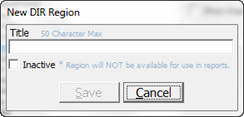
To add a new DIR Region, click the New button to open the New DIR Region pop up (figure 12).
Figure 12
The Title field will be blank. It is a requirement that the Title (name) of this DIR Region must be entered in the Title box. The Title may have up to 50 characters.
Once the Title has been entered, click the Save button at the bottom of the window and the new DIR Region is added to the DIR List.